
OPTION A
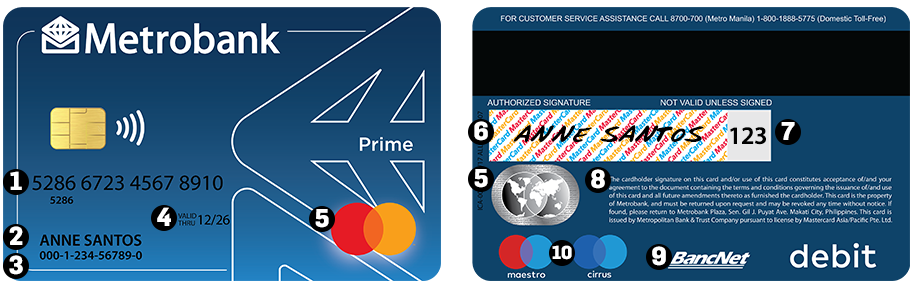
See below on how to identify the various parts of your debit card:
- Card number -- This identifies your card as a Metrobank-issued Mastercard Debit/Prepaid Card.
- Card name -- Identifies the owner of the card (i.e. your full name)
- Account number -- Allows you to do financial transactions at Metrobank branches and echannels.
- Expiry date -- The date when your card expires. Be sure to have it replaced if the expiration date is near.
- Mastercard logo (and hologram) -- Signifies that your card can make purchases at point-of-sale (POS) terminals, make online transactions, and pay without cash (contactless payments) at any Mastercard-affiliated merchant here and abroad.
- Signature panel -- Affix your signature immediately upon receiving your new card. This shall be used as verification by the merchant that you are the owner of the card.
- Security code (CVC2) -- This is needed when you do online transactions and other payment methods that do not require the physical card to be swiped for the transaction to be completed.
- Terms and Conditions -- Guidelines of Metrobank and Mastercard for the use of your card.
- BancNet logo -- Signifies that you can withdraw at any BancNet ATMs nationwide, and do PIN-based POS transactions.
- Maestro/Cirrus logo -- Signifies that you can withdraw at international ATMs when you travel or work abroad.
OPTION B
You can find your 13-digit account number on the debit card just below your name.
If your account number does not appear on your debit card, please call our Contact Center at (02) 88-700-700 or visit your branch of account.
Comments
0 comments
Please sign in to leave a comment.